Meeting notes that never leave your Mac.

Stop losing what was said in meetings. MeetingVault transcribes every call in real time and gives you searchable notes in seconds. Runs entirely on your Mac. Your audio never touches a server.

Join the Founding Waitlist $9/mo founding rate · macOS 14+ · Apple Silicon
No account required
100% local processing
Audio auto-deleted
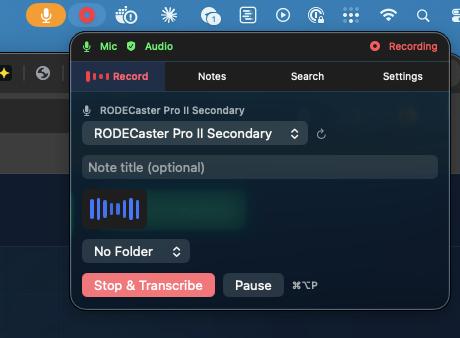
MeetingVault recording in progress - menu bar popover showing mic and system audio capture
Recording in progress
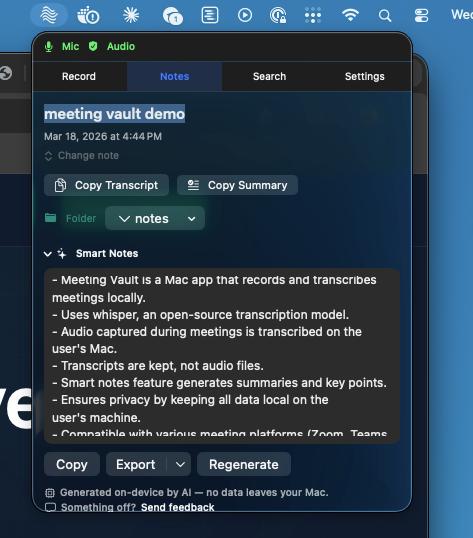
MeetingVault notes view showing your transcript and notes after a meeting
Notes ready instantly
100%
On-device processing
0
Bytes sent to the cloud
<30s
From meeting end to searchable notes
$0
Per transcription (runs locally)

Listen. Transcribe. Delete the audio.

You get the notes. The audio disappears. No internet required after setup.

Step 1

Listen

Click start in your menu bar. MeetingVault captures both sides of the conversation: your mic and system audio. Works with Zoom, Teams, Meet, FaceTime, and more.

Step 2

Transcribe

When you stop, the transcription engine converts everything to text on-device. Then the audio file is deleted. Only your notes remain.

Step 3

Review

Search across every meeting you've ever taken notes on. Export to Markdown, Obsidian, JSON, or SRT. Your notes, your system.

We can't see your data. By design.

We don't run servers. We don't collect data. Your notes live on your Mac and nowhere else. That's the product.

Audio is temporary. Notes are forever.

Audio is transcribed on your Mac and then deleted, automatically. No recordings sitting on your disk, no audio files that could be subpoenaed or leaked. You keep the text. The audio is gone.

Your conversations don't train anyone's AI.

Your meeting content never leaves your Mac. No third-party analytics SDKs. No Firebase, no Mixpanel, no Segment. The only outbound requests are software update checks and the one-time Whisper model download. Your meetings stay yours.

Uninstall and it's gone. Really.

No account to "delete." No 30-day data retention policy. No email to support begging them to purge your records. Drag to trash. Done. There's nothing on our end to clean up because there's nothing on our end.

Everything you need to stop losing information

One plan. Everything included. No tiers, no upsells.

On-device transcription

Powered by WhisperKit. Runs on Apple Silicon. After the one-time model download, transcription works with no internet connection. Choose from multiple model sizes in Settings.

Mic + system audio

Capture your voice and the other side of the call simultaneously. Works with Zoom, Teams, Meet, FaceTime, Slack, and more.

Auto-delete audio

Audio is processed temporarily and deleted after transcription. You keep searchable text notes. No audio files sitting on your disk.

Full-text search

Search across all your transcripts instantly. Find that thing someone said three weeks ago in seconds.

Menu bar design

Lives in your menu bar, not your Dock. Start capturing in one click. Visual indicators show when it's listening.

Export anywhere

Markdown, JSON, SRT subtitles, or Obsidian-ready format. Your transcripts flow into whatever system you use.

Meeting detection

Detects when Zoom, Teams, or other meeting apps start. Nudges you to capture notes. No bots, no auto-join, just a tap.

Global hotkey

Pause and resume recording from any app with a keyboard shortcut. No need to switch windows.

The competition stores your audio on their servers and trains AI on your conversations

MeetingVault never touches your audio. Everything stays on your Mac.

MeetingVault Otter.ai Fireflies Granola
Audio stored Deleted after transcription On their servers On their servers Cloud-processed
Bot joins your call No Yes Yes No
App login required No Yes Yes Yes
Works offline Yes No No No
Trains AI on your data No Yes Yes Yes
Export formats MD, JSON, SRT, Obsidian Limited Limited Limited

Who's using this

People who got tired of choosing between convenience and privacy.

Privacy-first professionals

Lawyers, therapists, consultants: anyone whose conversations can't end up on someone else's server. Attorney-client privilege doesn't survive a cloud upload.

AI memory builders

Building a personal memory system? Meetings are the biggest gap. Export every conversation as Markdown into Obsidian, Notion, or your AI context layer. MeetingVault is the capture engine for people building their external brain.

Mac-native purists

Built with SwiftUI, runs on Apple Silicon, lives in your menu bar. No Electron. No web wrapper. No Dock clutter. If you care about how your tools are built, you'll feel at home.

Simple, honest pricing.

We're in alpha and looking for 500 founding members who care about privacy.

Founding Member
$19/month
$9 /month

Founding member rate. Stays fixed for the life of your subscription.

Founding member spots Loading...
  • Full app with all features
  • All future updates included
  • On-device transcription (no cloud processing)
  • Audio auto-deleted, only notes remain
  • Export to Markdown, JSON, SRT & Obsidian
  • Direct input to the product roadmap
  • No account. No cloud. No tracking.
Claim Founding Member Spot

Alpha access. Cancel anytime. $9/month founding rate, fixed for the life of your subscription.

Regular price after founding period: $19/month.
Requires macOS 14 (Sonoma) or later · Apple Silicon (M1+) · 16GB RAM

Claim your founding member spot

$9/month founding rate. First 500 members only.

No credit card now. Cancel anytime after launch.

Questions people actually ask

Is my data really private?
We don't run servers. We literally can't see your data. There's no account, no login, no analytics, and nothing phones home. Your notes live in a local database on your Mac that only you can access. And here's the thing most people don't realize: we don't even keep the audio. It's transcribed on-device and then deleted. All that remains is text. No audio files on your disk, no audio files on our servers (we don't have servers).
Does it work without Wi-Fi?
Yes, after initial setup. The Whisper model downloads once on first launch (~500 MB). After that, MeetingVault works on an airplane, at a cabin, anywhere. Transcribe, search, export: all offline. The only ongoing network activity is software update checks, which don't involve your meeting content.
What happens to the audio?
It's gone. MeetingVault temporarily captures audio to transcribe it, then deletes the audio file automatically. You're left with searchable text notes. No audio recordings sitting on your hard drive, no files that could be subpoenaed or leaked. Legally, this makes MeetingVault a note-taking tool, not a recording tool. That distinction matters more than most people think.
Can I get my data out?
We'd never hold your notes hostage. Export to Markdown, JSON, SRT subtitles, or straight into Obsidian with proper frontmatter. A common workflow among our beta testers is a pipeline from MeetingVault into their Obsidian vault: meeting happens, transcript appears in their notes, searchable forever. Your notes, your format, zero friction.
What about recording consent laws?
We built consent into the product, not as an afterthought. Before your first recording, the app walks you through the legal landscape. Before every recording, it reminds you to notify participants. There's even a one-click tool that copies a consent notice to your clipboard so you can paste it right into the meeting chat. 11 US states require all-party consent. Justia has a great state-by-state breakdown. We take this seriously because our users do.
Is it on the Mac App Store?
Not yet. We originally built MeetingVault for ourselves because we were tired of cloud tools recording our sensitive calls. Then we shared it with a few friends, they shared it with theirs, and here we are. Right now we're focused on making the best product possible and keeping the price honest, rather than handing Apple 30% that we'd have to pass on to you. The app is signed and notarized by Apple, so your Mac trusts it out of the box. We'll probably hit the App Store eventually, but we're in no rush.
Why should I trust you over Otter or Granola?
You don't have to trust us, and that's the whole point. Cloud transcription tools ask you to trust that they'll handle your audio responsibly on their servers. Some of them are currently facing lawsuits over exactly that. We don't ask for trust because we never touch your data in the first place. We don't even keep audio files. They're deleted after transcription. No servers to breach, no recordings to subpoena, no dataset to train on. The architecture is the guarantee.

Go deeper

Guides, templates, and workflows for private meeting notes.

Your meetings. Your notes. Nothing else.

Cancel anytime. No account required. Your meeting content never leaves your Mac.

Join the Founding Waitlist